
Purchased but no longer usable: Please check your internet connection!
I bought the Auphonic desktop software years ago. I use it to improve the audio for our YouTube videos. Unfortunately, the software activation no longer seems to be working.
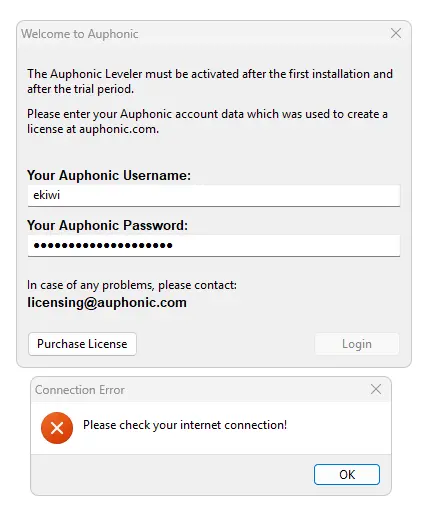
All I get is the message: “Please check your internet connection!”. There is also no new or old version available to download on the website. Although the product page can still be found here, the actual download link returns a 404 error. Page not found.
Analysis of the activation process using WireShark returns the following:
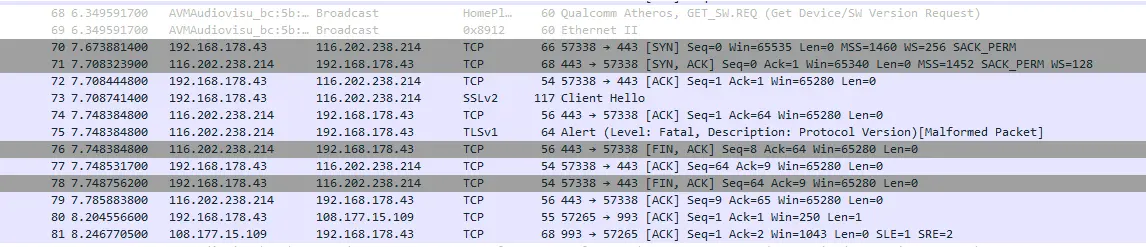
The activation simply fails due to outdated security standards: the Auphonic Leveler uses outdated protocols such as SSLv2 or TLS 1.0 for the licence check, which are no longer accepted by modern servers for security reasons. In Wireshark, this appears as Protocol Version Error – the necessary TLS handshake fails, whereupon the software incorrectly reports a missing internet connection. As the encryption is hard-coded into the programme code of the outdated standalone app, this connection error cannot be resolved locally.
Conclusion
I’ve now contacted support. Let’s see if anything comes of it. Once again, the downsides of software activation are becoming apparent. If the manufacturer loses interest or passes away, even the local version is of no use.
Basically, providers are shooting themselves in the foot with this sort of thing; I now tend to steer well clear of such software.
Update from Support
Unfortunately, no positive response from Support:
Unfortunately, there is no offline key or manual activation, as this is an issue with newer operating system versions 🙁
It is a problem with our used UI toolkit, which is not supported anymore. Our program is refused and we would have to rewrite the whole user interface unfortunately.
Which, unfortunately, confirms once again that online activation is ultimately just a temporary purchase.