
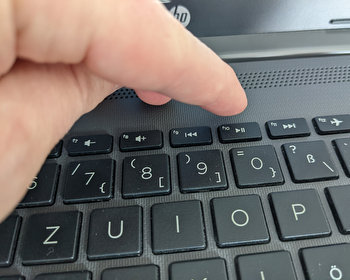
How do I access the start menu, boot menu on the HP Probook? How do I enter the BIOS?
Video
Open start menu / Bios / UEFI on the HP Probook
First we switch off the computer, start it and press the ESC key repeatedly directly at startup.

A message appears that the “Startup Menu” has now been called up. Here we have access to various functions, so we can call up the boot menu, access the bios and call up various tests. The ESC key is therefore quite universal. Here we also see other keys that we can press at startup, e.g. to go directly to the bios.
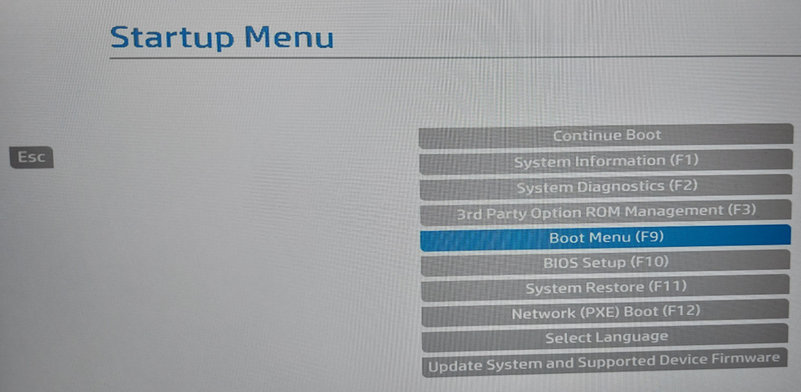
HP Probook: Call up boot menu
We reach the boot menu directly with F9. Instead of ESC, press F9 repeatedly at startup. The boot menu appears directly.

HP Probook: Call up Bios / UEFI
We can call up the bios directly with F10 at startup. Same procedure, press the key repeatedly until the message appears.
Bestseller No. 1

HP (FullHD 17,3 Zoll Premium Notebook (AMD Ryzen 7 7730U 16-Thread CPU...
- Das Laptop ist mit einem superschnellen AMD Ryzen7 7730U 16-Thread Prozessor ausgestattet, der für...
- Eine riesige 512 GB SSD stellt mehr als genug Platz für ihre Daten und Anwendungen bereit, die...
- Das Laptop Gerät ist leise gekühlt und sehr leicht, entspanntem Arbeiten / Internetsurfen steht...
Bestseller No. 2

HP ProBook 460 G11 Business Laptop, Intel Core Ultra 5 125U, 16" WUXGA...
- 【Schnelle Zufriedenheit】 Das HP ProBook 460 G11 vereint die effiziente Intel Core Ultra 5 125U...
- 【Prozessor & Betriebssystem】12-Kern Intel Core Ultra 5 125U Prozessor: bis zu 4,3 GHz...
- 【Grafikkarte】Integrierte Intel Grafik für eine flüssige, klare Bild- und Videodarstellung...
SaleBestseller No. 3

HP Laptop, 17,3" HD+, Intel N200, 8GB RAM, 256GB SSD | Zuverlässiges...
- MEHR ÜBERBLICK IM ALLTAG: Arbeite komfortabel mit mehr Bildschirmfläche für Office, Streaming und...
- ZUVERLÄSSIGE LEISTUNG FÜR DEINEN TAG: Erledige Aufgaben schnell und stabil im Alltag. Der Intel...
- KOMFORTABLE BEDIENUNG FÜR LANGE SESSIONS: Arbeite entspannter dank großem Clickpad und...
450,83 EUR

Buy on Amazon