

Linux alternative to Monitorian: “ddcutil” and “ddcui”.
Under Windows, I like to control the screen brightness with the software “Monitorian“. The software allows me to control the brightness directly via software without having to navigate through the monitor’s menu.
There is also an alternative for Linux. Let’s get started. The DDC protocol must be activated for this to work. There can also be problems if the computer is connected using an adapter or docking station. That right up front.
Video
ddcutil on the command line
If you want to be active on the command line, you can install “ddcutil“.
sudo apt install ddcutil
The current brightness can be read out with the following command
ddcutil getvcp 10
The following command sets the brightness, in this example to 60 %:
ddcutil setvcp 10 60
With user interface: ddcui
Command line is fancy and always makes an impression on outsiders, but I can’t remember any commands. No problem, there is also a graphical user interface for Linux called “ddcui”
sudo apt install ddcui
To start we execute the following command.
ddcui
The application interface is somewhat more extensive. Here we can select the display. We activate the configuration under View. The software recognizes what can be controlled. In addition to the brightness, we can also make other settings, e.g. contrast and color temperature on my monitor.
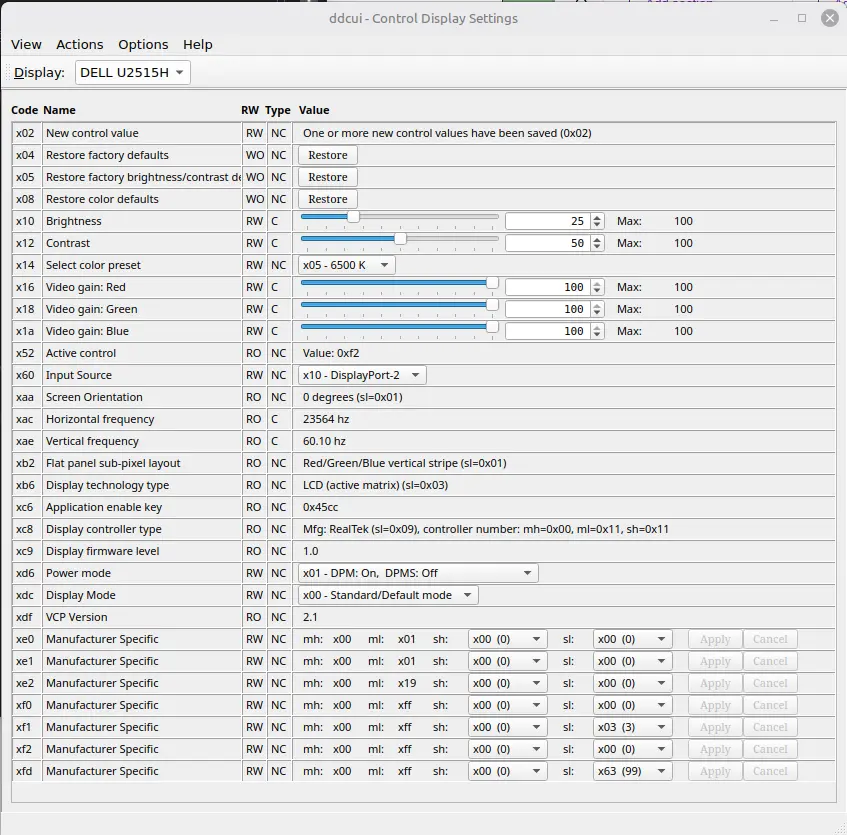
The standard things worked without any problems. Other things generated errors, e.g. a reset to factory settings.
Conclusion
Even for Linux, the screen can be quickly controlled via software without having to go through the monitor’s on-screen menu.
On mint cinnamon (guess there is similar for Mate).
There is an applet you can add to your taskbar on mint 21.3 called brightness and gamma applet.
For mint 22.3 there is an applet called ddc/ci multi monitor. I don’t think it says for this applet, but you also need to install ddcutil.
Neither work through my particular capture card but work fine when connected straight through.
Thanks for your linux content, well done.
Thanks for the feedback. 😊