
How do I hide unwanted games and entries from the library?
It’s not like the list of entries in the Steam library is long enough due to all the sales and special offers. Some time ago, a lot of entries with SDKs, dedicated servers and other tools were added. Of games that I don’t own myself.

Now it has bothered me enough that I wanted to get rid of it. The solution is simple, but time-consuming. Entries can be hidden. To do this, we click on the game and select the option in the context menu.
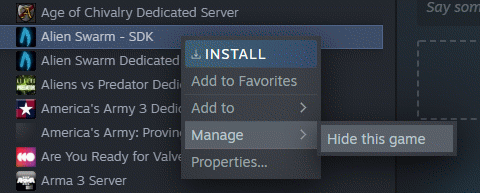
We now do this for each entry. Yes, this is annoying. If you want to see the entries again, you can do this via the display menu.

Bestseller No. 1

Acer Nitro V17 AI | Gaming Laptop | Ryzen 7 | RTX 5060 | 16GB | 1TB
- PROZESSOR: AMD Ryzen 7 260 (3,8 GHz GHz Basistakt mit bis zu 5,1 GHz max. Leistungstaktrate) - AMD...
- GRAFIKKARTE: NVIDIA GeForce RTX 5060 - 8GB GDDR7 VRAM Diese GPUs bieten ultimative Leistung für...
- ANSCHLÜSSE: 1xHDMI, Displayport über USB Type-C, USB 4.0 Type-C, 3xUSB 3.2 (2x Type-A Gen.2 (1x...
1.187,65 EUR

Buy on Amazon
Bestseller No. 2

MSI Cyborg 15, Gaming-Laptop, 15,6 Zoll Full-HD 144 Hz Display, Intel Core...
- Intel Core 7 Prozessor 240H, Windows 11 Home, NVIDIA GeForce RTX 5060 Laptop GPU 8GB GDDR7, 16 GB...
- 15,6 Zoll Full HD (1.920 x 1.080 Pixel) 144 Hz Bildschirm
- Stürze dich im Cyberpunk-Stil in deine Games, zeig deinen Sci-Fi-Style und häng deine Gegner mit...
1.199,00 EUR
Buy on Amazon
Bestseller No. 3

HP Omen MAX 16 Laptop, Intel Ultra 7 255HX, RTX 5070 Ti, 32GB RAM, 1TB SSD
- MAXIMALE GAMING-POWER: Intel Core Ultra 7 und NVIDIA GeForce RTX 5070 Ti mit 12 GB GDDR7 liefern...
- 240 HZ. 3 MS. VOLLE ACTION: Das 16 Zoll WQXGA-Display mit bis zu 240 Hz, 3 ms, 500 Nits und NVIDIA...
- KÜHL BLEIBEN. VOLLGAS GEBEN: Vapor Chamber, Flüssigmetall und selbstreinigende Lüfter halten die...
2.179,00 EUR
Buy on Amazon